Showing posts with label baby scrapbook page. Show all posts

Friday, November 22, 2013

MDS 141 Meeting Baby Sister Scrapbook Page

 
I started out with paper #7 from the Sunset Serenade DSP kit.  Just added a little of this and that and presto!  MDS Software is easy enough for beginners, but includes a variety of tools for advanced designers too. Anyone can try it FREE for 30 days! Click on the ‘Shop Now’ button at the top of my Blog and download it (item 130910) or you can order the MDS Trial Disc 10 Packs (item 132919) to get it into your hands!

This is #7 paper from the Sunset Serenade DSP

Background:  Designer Series Paper\_Designer Kits\Sunset Serenade - designer series paper\Sunset Serenade – 7.
Embellishments:  Designer Kits\Strength & Hope - elements\Strength & Hope - circle 1, Designer Kits\Downtown Grunge - embellishments\Downtown Grunge - frame 1, Designer Kits\Strength & Hope - elements\Strength & Hope - circle 1, Designer Kits\Strength & Hope - elements\Strength & Hope – love, Designer Kits\Strength & Hope - elements\Strength & Hope - colored polka dot, Round Buttons\So Saffron – button, Baker's Twine\Baker's Twine - White knot.
Stamps:  Designer Kits\Back to School\Back to School - grunge piece, Color = NOT QUITE NAVY, Elizabeth\Elizabeth - element, Color = NOT QUITE NAVY.
Punches:  Extras\Flag Punch, Borders\Tasteful Trim Shape 2, Extras\Flag Punch, Oval Punch, Fill Color = SO SAFFRON, Extras\Butterfly shape – 1.


Page before adding photos.
 

Friday, November 8, 2013

MDS 139 A Special Place for Baby Scrapbook Page

Did you know that no fonts come with My Digital Studio (MDS)?  Nope.  You use the fonts that are on your computer!  How cool is that!  Plus, not only can you color fill a punch, you can paper fill it too as I did with the word ‘Place’.  And look at the tear I have across the bottom of one mat!  That was done with a stamp then color matched to my background paper!  Too neat! 

If you are thinking about digital scrapbooking, now is the time to do it!  You can download MDS for a free 30 day trial period.  Click on the Shop Now button at the top of my Blog for more info.  You will be hooked!

Page before adding photos.
Background: Color = CERTAINLY CELERY.
Embellishments: Grosgrain Ribbon\Whisper White Grosgrain Ribbon; Eyelets\More Mustard eyelet; Grosgrain Ribbon - knot\Very Vanilla Grosgrain Ribbon - knot
Stamps: Torn Edges\Torn Edges - hand torn, Color = CERTAINLY CELERY; Designer Kits\Summer Home - stamps\Schoolbook Serif Alphabet\Schoolbook Serif Alphabet - a, Color = WHISPER WHITE; Epic Overlays\Epic Overlays - Color = MORE MUSTARD; Little Additions\Little Additions - bear, Color = EARLY ESPRESSO; Little Additions\Little Additions - abc, Color = EARLY ESPRESSO; Little Additions\Little Additions - element 3, Color = EARLY ESPRESSO.
Punches: 1.25 Square Punch, Fill Color = MORE MUSTARD and CERTAINLY CELERY; Alphabet & Numbers\Timeless Type Junior Letters\Timeless Type Junior Lowercase.


Fonts: CK Cursive size 32 (special), Pea Girly Girls Print size 30 (for).

Friday, July 19, 2013

MDS 123 Simple is Beautiful Scrapbook Page

 
One of the features of MDS that I used on this page was the ability to crop an embellishment!  The zigzag stitch under the phrase was 12” – I cropped it to 3” by right clicking on it then Edit Object.  Once that window opens, change the W to the width you want then hit your Tab button and it will automatically adjust the H (height).  It’s that simple!  I’m using a PC.  I’m sure there can’t be much difference with the Mac. My Digital Studio starts with nearly 2,000 unique elements--stamps, embellishments, templates, kits, punches, Designer Series papers, card stock, borders, and more.  PC and Mac compatible.  It is offered FREE to first time users for a free 30 day trial period.  
With the FREE 30-day trial, you’ll get:
* Full access to the software at NO COST for 30 days
* Full access to design tools to create cards, photobooks, calendars, and more
* Full access to a sample of exclusive artwork
* The chance to buy additional downloads that you can keep after your trial expires
* Ability to order your projects from our professional print services
To use the software more than 30 days, buy the full MDS software (item 130646) for only $24.95!  You heard me right! 
Click on the ‘Shop Now’ button at the top of my Blog to get you to the right spot.


Page before adding photos.
Background
Designer Series Paper\_Designer Kits - Love Letter - pattern 9.
Embellishments
Staple & Stitching\Basic Black - Stitching Zigzag
Brads\Basic Black – brad.
Stamps
Extreme Elements\Extreme Elements - flour de lis
Seriously Awesome - simple is, square frame.
Punches
1.25 Circle Punch

Spiral Punch
Modern Label Punch    

Decorative Label Punch.

Friday, July 12, 2013

MDS 122 Lullaby and Good Night Scrapbook Page


Found a new challenge on the Stamping Down Under Blog and you know how I LOVE sketches!!  I am presently scrapping our youngest daughter’s pictures from 2009.  She hasn’t done the journaling for this page yet.  Can’t believe how fast the little ones grow!  Besides following Nichole’s sketch, the only other thing I did was crop my title to fit into the curly label punch.  Anything is possible with MDS!  If you are thinking about digital scrapbooking, you can download MDS (My Digital Studio) for a free 30 day trial period.  Click on the ‘Shop Now’ button at the top of my Blog for more info.  You will be hooked!


Page before adding photos.
Background - Designer Series Paper\_Designer Kits\2010 In Color Patterns - designer series paper\Blushing Bride Polka Dots.
Embellishments - Designer Kits\Lemonade Stand - embellishments\Lemonade Stand - stitching 2.
Stamps - School Days II\School Days II - frame 2, Color = MARINA MIST, Chat Room Baby\Chat Room Baby - lullaby, Color = MELON MAMBO, Nursery Necessities\Nursery Necessities - small star, Color = MELON MAMBO and MARINA MIST, Little Additions\Little Additions - heart, Color = MELON MAMBO.
Punches - Curly Label Punch, 1.25 Square Punch filled with: Designer Series Paper\_Designer Kits\Nursery Nest - designer series paper\Nursery Nest – 12 and 2, Borders\Tasteful Trim Shape 3, Fill Color = MARINA MIST.

 
MDS Sketch #1
Nicole's Sketch

Friday, May 10, 2013

MDS 113 Photos in Punches

Do you ever wish you had the time to get out the doilies, glue, and glitter and scrap a page or make a card make for someone you love? If your schedule is packed, My Digital Studio could be your answer. It’s fast, it’s mess-free, and it’s a blast to use. Try it right now for FREE with their 30-day trial!  Click on the ‘Shop Now’ button at the top of my Blog for more info. 

Most of us rarely ever put a photo into any other shape than a rectangle or square.  And while it’s fun to fill your punches with bright colors or Designer Series Papers, did you know that you can fill any punch shape with a photo in MDS?

There is a Photos in Punches Challenge on Kimberly and Heather’s Facebook page this week.  I submitted this page. - I am waiting for Jackie to do the journaling.
Here is what you do:

1) Add the punch to your page.

2) Use the "Paper Fill" Option from the Design Center.

3) After you have selected a paper (it doesn't matter which one) double click on the punch on the page and zoom in on the paper to make sure it fills your punch.

4) From the Design Center click on ‘Fill with Photo’!   Your folder of photos comes. Choose your photo.

5) You can then zoom in on a particular area of the photo and/or move the photo within the punch window until you have it as you like it, then click "Okay".

Before putting your photos in the punch, get rid of any red eye – there is a button for that in MDS too.  I thought I could do it after, however, even tho you have replaced the paper with a photo, the program only recognizes it as a punch, not a photo.  I didn’t want to re-do the page, so these pictures have a bit of red eye!

I posted this page last March, which works for putting a photo in a punch also.  Now it has got a lot simpler - all you have to do is click on the ‘Fill with Photo’ button!
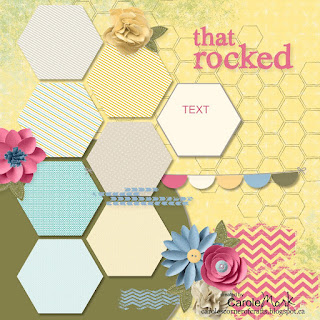
Here is the page before adding photos

Here is the Supply List:

Background
     Designer Series Paper\_Designer Kits\This And That Epic Day – 9

Embellishments
    Designer Kits\My Sweet Pea - elements\My Sweet Pea - stitched leaf
    Flowers\Bright Blooms\Bright Blooms - melon mambo 5, marina mist 6, melon mambo 3
    Flowers\Soft Blooms - embellishments\Soft Blooms - 2 so saffron, 2 very vanilla
    Round Buttons\So Saffron - button
    Buttons\Twitterpated - Baja Breeze large
Stamps
    Designer Kits\Lemonade Stand - honeycomb
    Designer Kits\Chevron - 8 grunge, 5 grunge, 1 grunge
    Little Additions - string, Color = GOING GRAY
    Designer Kits\Lemonade Stand - that rocked
Punches
    Basics\1.25 Circle Punch
    Basics\Hexagon Punch
    Basics\Half Circle Punch

Friday, February 15, 2013

MDS 101 Sweet Things Scrapbook Page

Just waiting for Jackie to add her journaling to this page. Hard to believe Brynn was that tiny!
I didn’t use anyone’s sketch for this page!!  Can you believe it??  I think this is the third time in my life!!  LOL
 
Paper: White Textured, Raspberry Splash.
Stamps: Decorative Overlays in Pale Plum, Raspberry Splash, Extreme Elements.
Embellishments: Raspberry Splash, Bakers Twine.
Punches: Square, Modern Label, Photo Corner.
Page before adding photos
 
Stay tuned for my next weeks post.  Would love to read your Comments so please leave one!

Related Posts Plugin for WordPress, Blogger...